The Platform

One platform. Built entirely
for agricultural advisors.

From capturing field observations offline to finding your next client with satellite data. Here's what PropelMapper does and how it works.

📱 Mobile & Field New

Built for where the
work happens.

A native mobile app designed for field conditions—offline capture, GPS tagging, and a dedicated map view that works when your connection doesn't.

📱 Mobile & Field

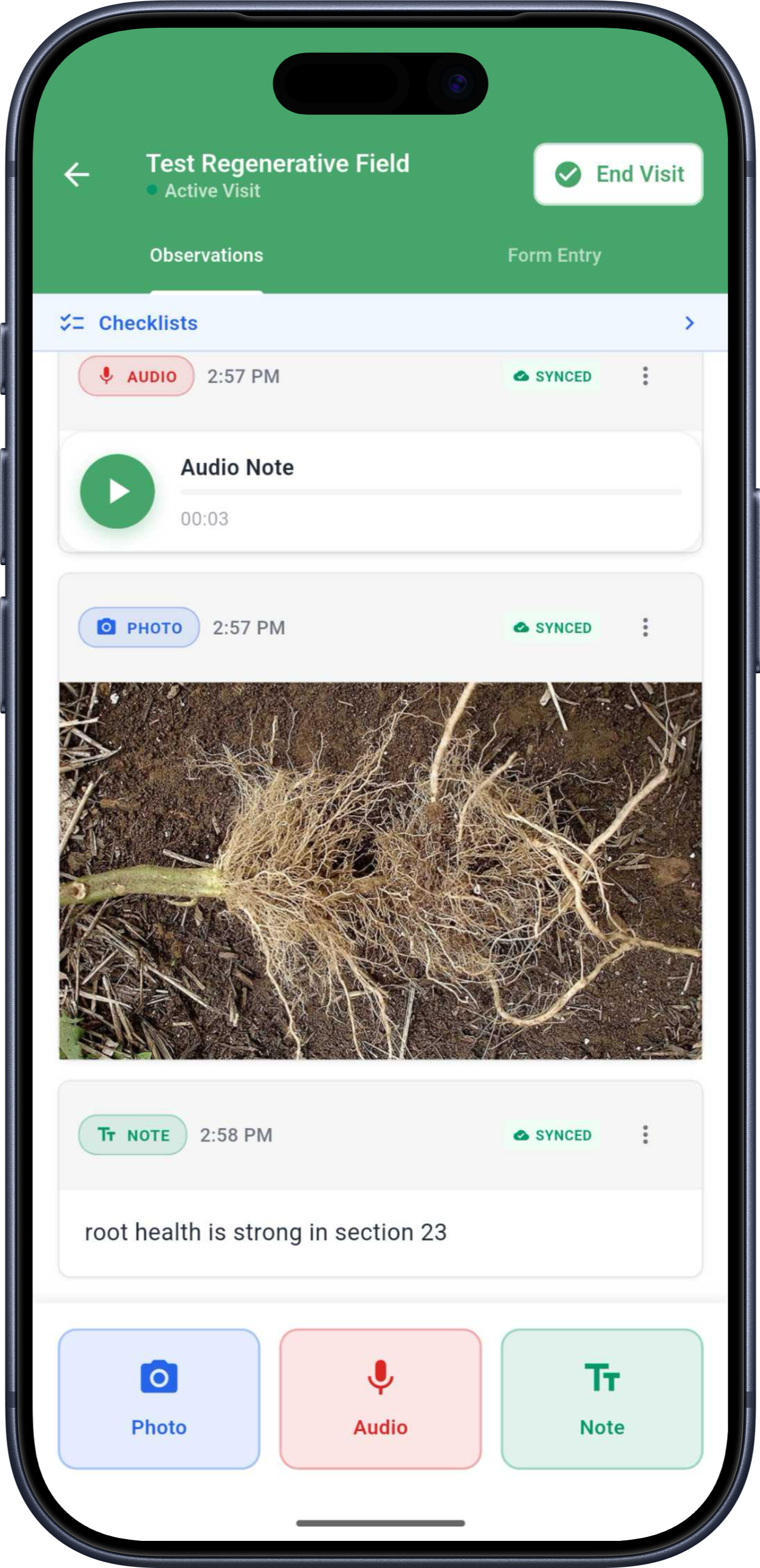
Offline Field Notes

New

Capture observations, photos, and GPS data without connectivity. Everything syncs automatically when you're back in range.

Offline Audio Prep Notes

New

Record voice memos before a visit. They sync and process once you regain signal—no connection required.

Dedicated Mobile Map View

New

A touch-optimized map built for field use—not a shrunken version of the desktop.

Camera Integration

New

Photos save directly to your camera roll, keeping field documentation organized and accessible.

Mobile Draw Tools

New

Sketch field boundaries, mark points of interest, and annotate areas directly on the mobile map.

Real-Time Sync

New

PowerSync infrastructure keeps your data current across devices the moment connectivity returns.

🎙️ Voice & Capture

Talk through what you see.
The report builds itself.

Voice-first documentation captures your observations at the moment they happen. PropelMapper structures them, extracts the data, and makes it all searchable—no typing, no forms, no extra steps.

🎙️ Voice & Capture

Voice Field Notes

Talk through your observations after every visit. PropelMapper transcribes, structures, and stores them automatically—tagged to the exact location.

Audio Briefings

Before each visit, listen to a prep note covering everything PropelMapper knows about that client. A briefing you can absorb while you drive.

Document Capture

New

Upload scanned PDFs, photos of forms, or handwritten notes. Values are extracted automatically—no manual data entry.

Document Pipeline

New

Track uploaded documents from upload through extraction. Extracted values auto-populate your field metrics.

Natural Language Queries

Ask questions about your field data in plain English. No SQL, no pivot tables—describe what you need and get answers.

Compounding Context

Every observation connects to the next. PropelMapper surfaces patterns across visits, flags unusual findings, and builds context that grows over seasons.

🗺️ Mapping

Every observation pinned
to where it happened.

Field notes carry GPS coordinates automatically. Draw boundaries, drop pins, and filter your data by geography—on desktop or in the field on mobile.

🗺️ Mapping

Spatial Mapping

Every field note is pinned to a location. View your observations geographically and identify patterns across your territory.

Mobile Draw Tools

New

Sketch field boundaries and mark points directly on mobile maps—no desktop required.

Map Filters & Layer Controls

New

Filter your map by date, advisor, crop type, or issue. Layer controls give you the exact view you need.

GPS Data Capture

New

Voice notes, photos, and videos are automatically GPS-tagged—even offline. No manual location entry.

🌾 Integrations New

Your data flows where
it needs to go.

Already using Cropwise? PropelMapper syncs directly—no re-entry, no duplicate work. Enterprise customers get full API access and custom integration support.

🌾 Integrations

Two-Way Cropwise Sync

New

Connect PropelMapper to Cropwise Operations. Changes flow in both directions—no copy-paste, no duplicate work.

Scout Report Exports

New

Push field note reports to Cropwise as scouting observations with a single action.

Field Synchronization

New

Import Cropwise fields and keep boundaries in sync automatically as your data changes.

Multi-User Cropwise Support

New

Multiple PropelMapper users connect to a single Cropwise account—built for advisory teams, not solo users.

Full API Access

Enterprise customers get CRUD API access for field notes, map features, and media. Build your own workflows on top of PropelMapper.

Data Export

Export your data anytime in standard formats (CSV, PDF). Your observations, your data. You're never locked in.

👥 Team & Collaboration New

See what's happening
across your entire team.

Managers get full visibility. Advisors stay coordinated. New team members onboard faster. And when someone leaves, their context stays.

👥 Team & Collaboration

Kanban Board View

New

Visualize field notes by status or category across your team. See what's in progress, what needs review, and what's done.

Sales Dashboard

New

A dedicated view built for tracking advisor activity, client coverage, and pipeline at a glance.

Visit Form Templates

New

Create reusable templates with custom metrics. Build once, use for every visit—standardize data collection across your team.

Streamlined Invitations

New

A faster invite flow in team settings to bring new advisors onto the platform.

Manager Visibility

Every field visit, every advisor, one dashboard. No more guessing what's happening in the field.

Knowledge Preservation

When an advisor leaves, their relationships, observations, and context stay with the team—not in their notebook.

🔍 Sales & Prospecting New

Find your next client before
you make a single call.

Client Finder uses Google Earth Engine to analyze satellite imagery and identify farms matching your ideal client profile—by size, crop type, and operation characteristics.

🔍 Sales & Prospecting

Similarity Search

New

Define what your ideal client looks like based on farm characteristics. Client Finder surfaces farms that match.

Google Earth Engine Integration

New

Analyze satellite imagery at scale to identify farm patterns—soil indicators, crop types, operation size, and more.

Reference Point Mapping

New

Drop reference points on the map to define your search area visually. No spreadsheets.

Sales Dashboard

New

Track prospecting activity, client coverage, and advisor performance from one view.

📄 Reporting New

Reports that write themselves.
From the data you already capture.

Generate branded PDF reports, capture digital signatures, and include weather summaries—all from the field data you're already recording.

📄 Reporting

Inline Report Editor

New

Edit and customize field note reports with inline editing—adjust content before sending to clients.

Signature Capture

New

Add digital signatures for approval workflows. Get sign-off from clients without printing a page.

Branded PDF Generation

New

Generate polished, branded PDF reports for clients or internal teams.

Weather Summaries

New

Reports automatically include weather data for the visit date and location, with extended forecast and unit conversion.

Natural Language Queries

Ask PropelMapper what happened across a client's fields last season. Get answers in plain English, ready to share.

Cross-Team Patterns

Aggregate observations across your team to surface trends—what products are performing, what issues are spreading, where to focus next.

See how it works
for your team.

Book a 30-minute demo. We'll walk through the features that matter for your operation, using your terminology and your workflow.